
Set your proposal defaults
Choose how long proposals stay valid, whether customers sign and pay online, and what every new proposal starts with.
Every new proposal starts from your company’s defaults. Set them once here; your team can still change most of them on a single proposal.
Who can do this: Admin.

-
In System, open Company › Company Settings and scroll to Proposals.
-
Change the settings you need:
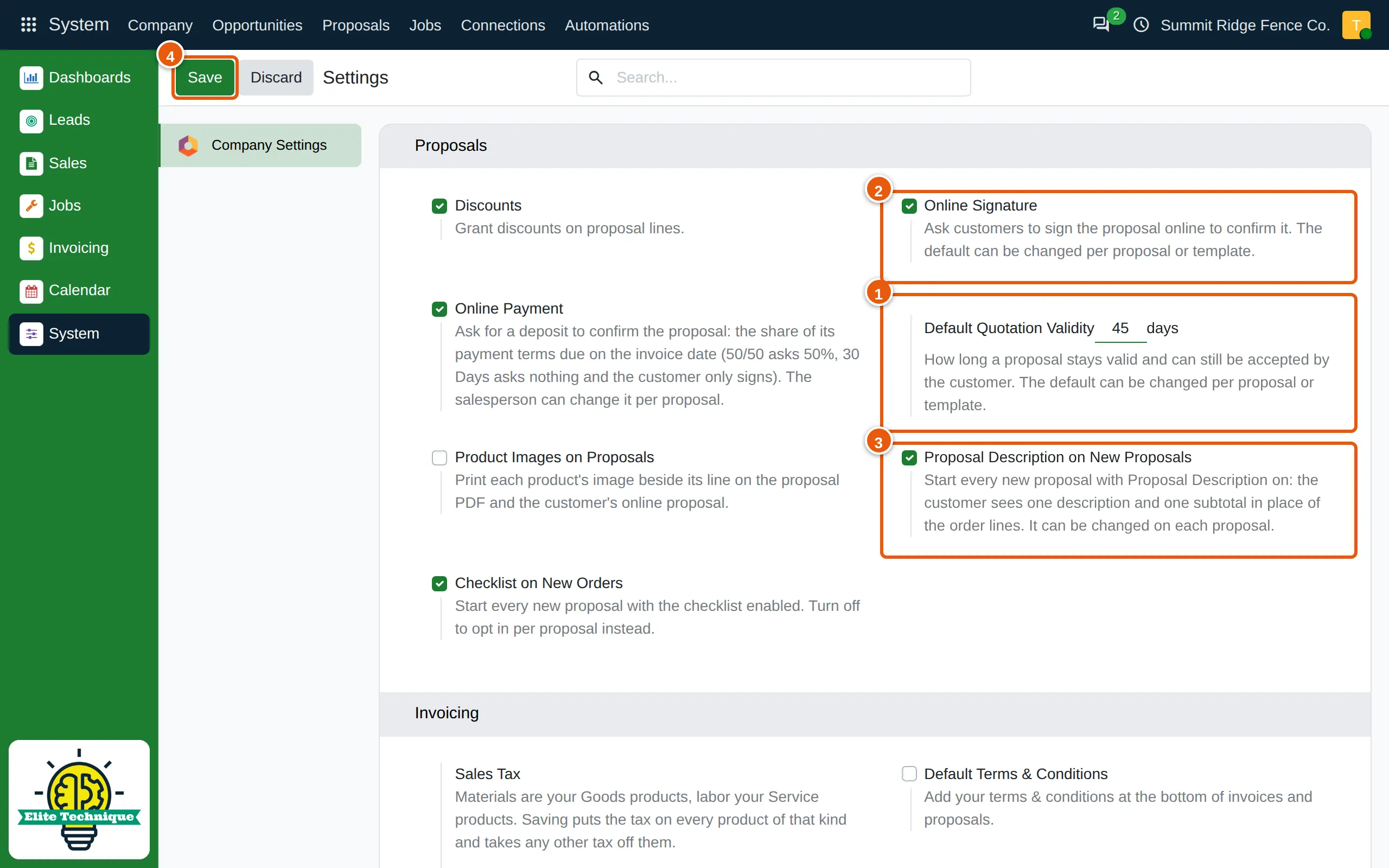
- Default Quotation Validity (1) — how many days a proposal stays valid and can still be accepted by your customer.
- Online Signature (2) — ask customers to sign the proposal online to confirm it.
- Proposal Description on New Proposals (3) — start every new proposal showing your customer one description and one total, in place of the lines.
- Online Payment — ask for a deposit when the customer confirms. The deposit follows the proposal’s payment terms: 50/50 asks for 50%, 30 Days asks for nothing and the customer only signs.
- Discounts — allow discounts on proposal lines.
- Product Images on Proposals — print each item’s image beside its line.
- Checklist on New Orders — start every new proposal with its checklist switched on.
-
Click Save (4) at the top.